Phrase Expander – Your texts and templates in a single place – For Windows
8 Item Sold
Lieftime Activation
For Windows
Comes with activation files
Phrase Expander – Your Texts and Templates in a Single Place – For Windows
Stop typing the same things over and over. Get Phrase Expander with lifetime activation and permanent license – own it forever with just one payment.
If you spend hours each day typing repetitive emails, filling out forms, or copying the same information into different programs, you need Phrase Expander. This powerful productivity tool saves you time by storing all your frequently used text snippets, templates, and phrases in one convenient place. Type a short abbreviation, and Phrase Expander instantly inserts the full text wherever you need it.
This is a genuine lifetime activation with a permanent license delivered via instant digital download. No monthly fees, no subscription renewals – just a onetime payment for software you’ll own and use forever. Our authentic license comes with a moneyback guarantee and free assistance to install and activate on your Windows 10 or Windows 11 computer.
Why Phrase Expander Changes How You Work
Every professional types certain things repeatedly throughout the day. Email signatures. Standard responses to common questions. Form fields with your contact information. Product descriptions. Code snippets. Legal disclaimers. Customer service replies. The list goes on.
Without Phrase Expander, you waste time typing these same things manually or hunting through old documents to copy and paste them. You risk making typos in important information like email addresses, phone numbers, or account details. You spend mental energy remembering the exact wording of standard responses.
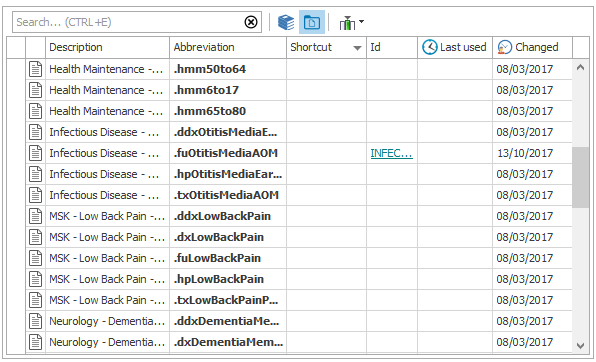
Phrase Expander solves all these problems. You create a library of text snippets – everything from a few words to multiple paragraphs – and assign each one a short abbreviation or keyword. When you type that abbreviation in any program, Phrase Expander automatically replaces it with the full text.
For example, you might set up “myem” to expand into your complete email address. Type “addr” to insert your full mailing address. Use “sig” to add your professional email signature with all your contact details. Create “refund” to paste your standard refund policy explanation.
The software works everywhere on your Windows computer – email programs, word processors, web browsers, chat applications, CRM systems, spreadsheets, forms, and any other program where you type text. You set it up once, and it works automatically in every application.
Complete Feature Set – Everything You Need for Text Expansion
Phrase Expander comes packed with features that make it far more powerful than simple text replacement. This is the full version with all functionality unlocked and ready to use.
Smart Text Expansion
The core function is intelligent text expansion. You define short abbreviations that trigger longer text snippets. But Phrase Expander goes beyond basic replacement:
- Instant Expansion: Text appears immediately as you type the abbreviation, with no noticeable delay
- Case Sensitivity Options: Choose whether abbreviations should be case-sensitive or work with any capitalization
- Word Detection: The software can detect word boundaries so “addr” expands but “address” doesn’t trigger expansion
- Manual Trigger Option: Set certain snippets to expand only when you press a specific key combination
- Abbreviation Suggestions: The software suggests available abbreviations as you type, helping you remember what’s available
Advanced Template System
Beyond simple text snippets, you can create sophisticated templates with dynamic content:
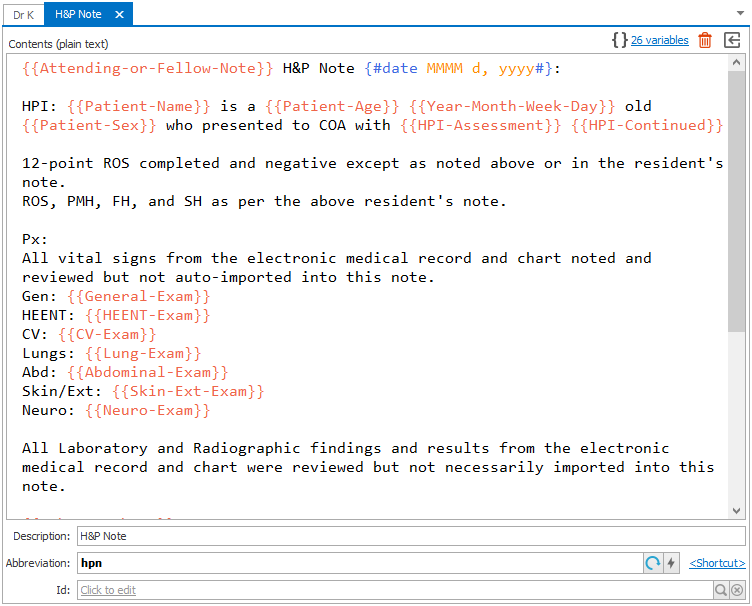
- Fill-in Fields: Create templates with blank fields that prompt you to enter specific information when the snippet expands
- Date and Time Insertion: Automatically insert the current date, time, or date/time stamp in any format
- Clipboard Content: Include whatever you last copied to the clipboard as part of an expanded snippet
- Cursor Positioning: Define exactly where the cursor should appear after a snippet expands, letting you immediately continue typing
- Multiple Variations: Store several versions of similar text and choose which one to insert when triggered
Organization and Management
As your library of snippets grows, Phrase Expander helps you stay organized:
- Folder System: Organize snippets into folders and subfolders by category, project, or any system that works for you
- Search Functionality: Quickly find any snippet by searching through abbreviations, content, or folder names
- Tags and Labels: Add tags to snippets for additional organization and filtering options
- Import and Export: Back up your entire snippet library or share specific collections with colleagues
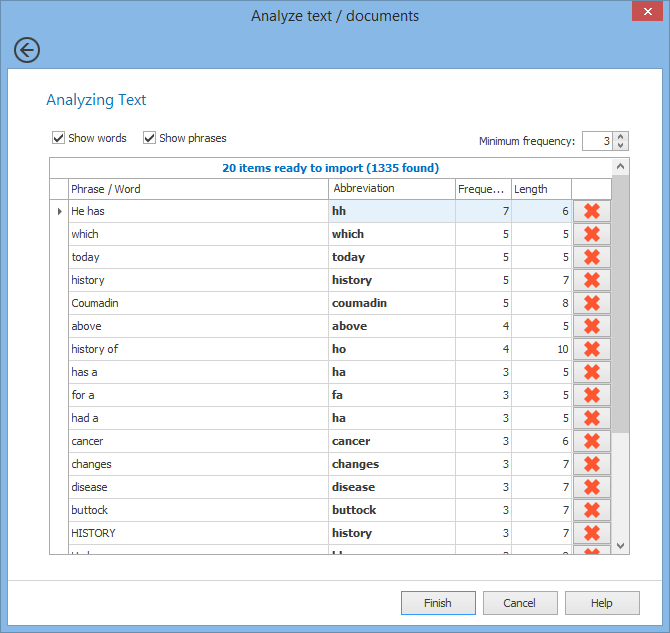
- Usage Statistics: See which snippets you use most frequently to optimize your workflow
Formatting and Rich Text
Phrase Expander preserves formatting when you need it:
- Basic Formatting: Maintain bold, italic, underline, and other basic text formatting in expanded snippets
- Font and Size: Preserve specific fonts and text sizes when needed for branded templates
- Lists and Structure: Keep bulleted lists, numbered lists, and paragraph structure intact
- Plain Text Option: Strip all formatting for situations where you need plain text only
Multi-Language Support
The software works with text in any language that uses standard keyboard input. Whether you type in English, Spanish, French, German, or any other language, Phrase Expander handles it correctly. You can even create multilingual snippet libraries if you work in multiple languages.
Special Characters and Symbols
Easily insert special characters, symbols, mathematical notation, currency symbols, or any Unicode character. This is especially useful for technical writing, international correspondence, or specialized fields that use specific symbols.
Security and Privacy
Your text snippets are stored locally on your computer, not in the cloud. This means:
- Complete Privacy: Your templates and frequently used text never leave your computer
- No Internet Required: The software works perfectly offline without any connection
- Data Security: You control where your snippet library is stored and backed up
- No Third-Party Access: Nobody else can see or access your text snippets
Perfect for Windows 10 and Windows 11
Phrase Expander is fully optimized for modern Windows systems. The software runs smoothly on both Windows 10 and Windows 11, taking advantage of the latest operating system features while maintaining compatibility with a wide range of applications.
System Compatibility:
- Full Windows 10 (64-bit) support across all editions
- Native Windows 11 compatibility with enhanced interface scaling
- Works with high-resolution displays and multiple monitors
- Minimal system resource usage – runs efficiently in the background
- Compatible with both desktop and laptop configurations
The easy installation and activation process works identically on both Windows versions. You download a single installer that automatically detects your operating system version and configures itself appropriately.
Application Compatibility:
Phrase Expander works with virtually every Windows application where you type text:
- Microsoft Office (Word, Excel, Outlook, PowerPoint)
- Web browsers (Chrome, Firefox, Edge, Opera)
- Email clients (Outlook, Thunderbird, Windows Mail)
- Chat and messaging (Teams, Slack, Discord, Skype)
- Note-taking apps (OneNote, Evernote, Notion)
- Code editors and IDEs (Visual Studio, Notepad++, Sublime)
- CRM systems and business software
- Form-filling in any application or website
- Text editors and word processors
- Spreadsheet applications
- Database front-ends and data entry programs
This universal compatibility means you learn one system and use it everywhere, rather than dealing with different text expansion methods in different programs.
Genuine Lifetime License – No Recurring Costs
This is an original genuine and legitimate license for Phrase Expander. You’re getting authentic software with full legal compliance and manufacturer backing. This isn’t a subscription that expires or a trial with limitations – it’s a permanent license that’s yours to keep and use forever.
What Your Purchase Includes:
- Permanent License: Use Phrase Expander indefinitely with no time restrictions or expiration dates
- Lifetime Activation: Activate the software on your computer and use it for as long as you need
- Global License: Valid for use anywhere in the world with no geographic restrictions or regional limitations
- Full Version: Complete software with all features and functions unlocked from day one
- Digital Download: Instant delivery via secure download link – no physical media or shipping delays
- Free Installation Support: Technical assistance included to help you get set up and activated
One-Time Payment Benefits:
The lifetime activation model offers significant advantages:
- No Subscription Fees: Pay once and never worry about monthly or annual charges
- No Renewal Hassles: No need to remember renewal dates or update payment information
- Predictable Costs: You know exactly what the software costs over its entire lifetime
- Budget-Friendly: Especially valuable for freelancers, small businesses, and individual professionals
- Long-Term Value: The more you use it, the better your return on investment becomes
Compare this to subscription-based text expansion tools that charge $5-10 per month or $50-100 per year. Over just a few years, those recurring fees add up to far more than this onetime payment. With Phrase Expander’s permanent license, you eliminate those ongoing costs entirely.
Real-World Benefits Across Different Professions
Phrase Expander helps professionals in virtually every field work more efficiently:
Customer Service Representatives
Customer service teams handle the same questions repeatedly. With Phrase Expander, they can:
- Insert standard greetings and closings instantly
- Provide consistent answers to frequently asked questions
- Include proper formatting and links in every response
- Maintain brand voice across all communications
- Respond to customers faster, improving satisfaction ratings
A customer service rep might have dozens of snippet templates for different scenarios – order status inquiries, refund requests, technical troubleshooting steps, shipping information, and more. Instead of typing the same explanations repeatedly, they use abbreviations to insert complete, well-formatted responses in seconds.
Healthcare Professionals
Doctors, nurses, and healthcare administrators deal with extensive documentation:
- Medical history templates for different conditions
- Standard examination findings and assessment notes
- Treatment plan frameworks for common diagnoses
- Patient education information and instructions
- Prescription details and medication information
- Insurance and billing code snippets
The time savings allow healthcare professionals to spend more time with patients rather than typing documentation. The consistency reduces errors in medical records and ensures important information isn’t forgotten or omitted.
Legal Professionals
Lawyers and legal assistants work with standardized language and templates:
- Contract clauses and standard legal language
- Case citations and legal references
- Client communication templates
- Court filing information and formatting
- Discovery requests and responses
- Legal disclaimers and notices
Legal work demands precision, and Phrase Expander ensures the same carefully worded language is used consistently without transcription errors that could have serious consequences.
Sales and Business Development
Sales professionals communicate with prospects and clients constantly:
- Introduction emails and outreach templates
- Product descriptions and feature explanations
- Pricing information and proposal sections
- Follow-up message templates
- Meeting scheduling language
- Demo and trial offer details
Sales teams can maintain personalization while still using templates for standard information, allowing them to reach more prospects without sacrificing message quality.
Technical Support and IT
Tech support teams provide instructions and solutions:
- Troubleshooting steps for common issues
- System configuration instructions
- Software installation guides
- Error message explanations
- Security and password reset procedures
- Remote access connection details
Technical accuracy is crucial, and Phrase Expander ensures technical instructions are provided consistently and correctly every time.
Content Writers and Bloggers
Writers who produce similar content types benefit from:
- Article structure templates
- Standard introductions and conclusions
- Frequently used phrases and transitions
- SEO meta descriptions and title formats
- Author bio information
- Copyright and attribution text
Writers maintain their unique voice while streamlining the repetitive structural elements of content creation.
Administrative Assistants
Administrative professionals handle correspondence and documentation:
- Meeting invitation templates
- Calendar appointment details
- Contact information for key people and departments
- Company address and contact details
- Standard memo and announcement formats
- File naming conventions and project codes
Administrative efficiency improves dramatically when common information can be inserted instantly without manual typing or copy-pasting from reference documents.
Programmers and Developers
Developers write code with common patterns:
- Function templates and code structures
- Comment blocks and documentation formats
- Variable declaration patterns
- Import statements and library references
- Testing frameworks and assertions
- Git commit message formats
While good IDEs have code completion, Phrase Expander works across all applications and can include documentation, comments, and other text that goes beyond pure code.
Easy Installation and Activation Process
Getting started with Phrase Expander is straightforward. After your purchase, you receive instant digital download access along with your license activation credentials. The entire process from purchase to working software takes just minutes.
Step-by-Step Installation:
- Download the Installer: Use the secure download link provided immediately after purchase
- Run the Setup: Double-click the installer file and follow the simple on-screen instructions
- Complete Installation: The installer places all necessary files and creates desktop shortcuts
- Activate Your License: Enter your license key when prompted during first launch
- Start Using Immediately: Begin creating and using text snippets right away
The installation process is designed for users of all technical levels. You don’t need to be a computer expert or understand complex technical concepts. The installer handles all the details automatically.
Free Assistance to Install and Activate:
If you encounter any questions or issues during installation or activation, free technical support is included with your purchase. The support team can help with:
- Installation troubleshooting on Windows 10 or Windows 11
- License activation and verification
- Initial configuration and setup
- Importing existing snippets from other tools
- Answering questions about features and functionality
This free assistance ensures you can get up and running smoothly, even if you run into unexpected technical challenges. You’re not left on your own to figure things out.
Creating Your First Text Snippets
Once Phrase Expander is installed and activated, you can start building your snippet library immediately. The interface is designed to be intuitive and easy to navigate.
Adding a Basic Snippet:
Creating a simple text snippet takes just seconds:
- Click the “New Snippet” button or use the keyboard shortcut
- Enter the full text you want to insert (your email address, for example)
- Assign a short abbreviation that will trigger this snippet (like “myem”)
- Save the snippet
Now whenever you type “myem” in any application, Phrase Expander automatically replaces it with your complete email address.
Creating Template Snippets:
For more advanced templates with fill-in fields:
- Create a new snippet and enter your template text
- Add special placeholders where you want to fill in information each time
- Define whether these fields should show a prompt, use date/time, or insert clipboard content
- Set where the cursor should appear after expansion
- Save and test your template
For example, you might create an email template that prompts for the recipient’s name, includes today’s date automatically, and positions the cursor at the start of the message body.
Organizing Your Library:
As you create more snippets, organization becomes important:
- Create folders for different categories (emails, forms, technical, etc.)
- Use descriptive names for snippets so you can find them easily
- Add tags or labels for additional filtering options
- Export important collections as backups
You can start simple with just a few snippets and expand your library over time as you identify more repetitive typing tasks.
Time Savings Calculator
Consider how much time Phrase Expander can save you. If you type your email address five times per day, your physical mailing address three times, and your phone number twice – that’s easily 5-10 minutes per day on just those three pieces of information.
Add in standard email responses, form data, product descriptions, code snippets, or any other text you type repeatedly, and you could easily save 30 minutes to an hour every single workday.
Over a month, that’s 10-20 hours saved. Over a year, that’s 120-240 hours – the equivalent of three to six full work weeks. All from a one-time software investment that pays for itself many times over.
Beyond the time savings, consider the accuracy improvement. Phrase Expander eliminates typos in important information like email addresses, phone numbers, account numbers, and technical instructions. This prevents embarrassing mistakes and costly errors that result from manual typing.
Why Choose Our Trusted Store
When you purchase Phrase Expander from our store, you’re buying from an established, reputable seller with a track record of satisfied customers.
What Makes Us Different:
- Genuine Software Only: We sell only authentic, legitimate licenses – never pirated or unauthorized copies
- Instant Delivery: Digital download links and activation credentials delivered immediately after payment
- Secure Payment Processing: Your financial information is protected by industry-standard encryption
- Competitive Pricing: Best price available for legitimate Phrase Expander licenses
- Customer Support: Responsive assistance available when you need help
- Money-Back Guarantee: Full refund available if you’re not satisfied with your purchase
Secure Online Payment:
Our payment system uses secure protocols to protect your credit card information and personal data. Multiple payment options are available for your convenience. The transaction process is quick and straightforward, with confirmation provided immediately.
Global Availability:
We serve customers worldwide. Your global license is valid for use in any country, and our digital delivery system works regardless of your location. Whether you’re in North America, Europe, Asia, Australia, or anywhere else, you can purchase and start using Phrase Expander immediately.
Investment That Pays for Itself
When you consider the time savings, accuracy improvements, and productivity gains, Phrase Expander represents an excellent investment for any professional who works on a computer.
Return on Investment:
If the software saves you just 30 minutes per day, that’s 2.5 hours per week or 10 hours per month. Value that time at even a modest hourly rate, and Phrase Expander pays for itself in the first month. Everything after that is pure benefit.
For businesses, multiply those savings across multiple employees. If five team members each save 30 minutes per day, that’s 50 hours saved per month across the team – more than a full week of productive work gained every single month.
Long-Term Value:
Because this is a permanent license with lifetime activation, you’ll continue getting value from this investment for years. Unlike subscription software where you pay every month or year, Phrase Expander is a one-time purchase that keeps delivering benefits indefinitely.
Professional Benefits:
Beyond time and money, Phrase Expander offers professional advantages:
- Faster response times to customers and colleagues
- More consistent communication that maintains your professional image
- Reduced stress from repetitive typing tasks
- Improved accuracy in important communications
- Better work-life balance by completing work more efficiently
Technical Specifications and Requirements
Phrase Expander is designed to run efficiently on standard Windows computers without requiring high-end hardware.
Minimum System Requirements:
- Operating System: Windows 10 (64-bit) or Windows 11
- Processor: Any modern Intel or AMD processor
- RAM: 2GB minimum (4GB or more recommended)
- Hard Drive Space: 100MB for software installation
- Display: Any resolution supported by Windows
- Internet: Required only for initial download and activation
The software runs in the background using minimal system resources. You won’t notice any performance impact on your computer, even while running multiple other applications simultaneously.
File Format and Data:
- Snippet libraries stored in standard format
- Easy backup and restore capabilities
- Export and import functions for sharing or transferring
- No proprietary formats that lock in your data
Frequently Asked Questions
Can I use Phrase Expander on multiple computers?
Your license allows installation on your primary computer. Additional licenses can be purchased at a discount if you need to use the software on multiple machines.
What happens if I get a new computer?
You can deactivate Phrase Expander on your old computer and activate it on your new one. The lifetime license transfers to your new hardware.
Does Phrase Expander work with my favorite applications?
Yes, Phrase Expander works with virtually all Windows applications including Microsoft Office, web browsers, email programs, chat applications, and specialized business software.
Can I share my snippets with colleagues?
You can export your snippet library or specific collections and share them with others. This is useful for teams that need to use consistent templates and responses.
How many snippets can I create?
There’s no practical limit to the number of snippets you can create. You can build libraries with hundreds or even thousands of text snippets if needed.
What if I need help or have technical questions?
Free installation and activation assistance is included. For ongoing questions about using features, documentation and resources are available, and you can contact support.
Is my data secure?
All snippets are stored locally on your computer, not in the cloud. Your data never leaves your system unless you choose to export and share it.
Can I use Phrase Expander offline?
Yes, once installed and activated, Phrase Expander works completely offline. No internet connection is required for daily use.
Purchase Phrase Expander Today
Ready to eliminate repetitive typing and boost your productivity? When you buy Phrase Expander with lifetime activation, you’re making a smart investment that pays dividends every single day you use it.
What You Get:
- Full version of Phrase Expander with all features unlocked
- Permanent license with lifetime activation
- Instant digital download for immediate use
- Global license valid worldwide
- Free installation and activation assistance
- Compatible with Windows 10 and Windows 11
- Money-back guarantee for risk-free purchase
- One-time payment with no recurring fees
Best Price Available:
Our competitive pricing makes this powerful productivity tool accessible to individual professionals, small businesses, and large organizations alike. The one-time payment model means you can calculate exact costs and enjoy unlimited future use without ongoing subscription expenses.
Buy Online with Confidence:
Our secure online payment system protects your information while providing instant access to your software. Complete your purchase now and start using Phrase Expander within minutes.
Don’t spend another day typing the same things over and over. Join thousands of professionals who have streamlined their workflow with Phrase Expander. Purchase your lifetime license today and start saving time tomorrow.
Your productivity upgrade is just one click away. Buy Phrase Expander now and experience the difference that intelligent text expansion makes in your daily work. With lifetime activation, free support, and a money-back guarantee, there’s never been a better time to invest in working smarter instead of harder.
Related products
-
Nuance Dragon Naturally speaking for documentation productivity
Original price was: $39.99.$33.99Current price is: $33.99. -
Purchase WinRar software – file extractor and file archive creator
Original price was: $19.99.$9.99Current price is: $9.99. -
Adobe Acrobat Pro DC 2025- create , Edit PDF files Lifetime Activation for Windows
Original price was: $39.99.$23.99Current price is: $23.99. -
Adobe Dimension 2025 – Lifetime Activation For Windows
Original price was: $59.99.$39.99Current price is: $39.99. -
Adobe Premiere Pro 2025 for MAC – Lifetime Activation
Original price was: $59.99.$39.99Current price is: $39.99.