

Adobe Acrobat Pro DC 2025- create , Edit PDF files Lifetime Activation for Windows
2118 Item Sold
Original – Full Functions – Lifetime Activation – No extra fees in the Future
Adobe Acrobat Pro DC 2025 – The Ultimate PDF Solution with Lifetime Activation
Transform the way you work with documents forever. Adobe Acrobat Pro DC 2025 with Lifetime Activation brings professional-grade PDF creation, editing, and management capabilities directly to your Windows computer – no monthly subscriptions, no recurring fees, just pure productivity power that’s yours to keep.
Why Choose Adobe Acrobat Pro DC 2025 with Lifetime Activation?
Picture this: you’re racing against a deadline, and you need to make critical changes to an important PDF document. With Adobe Acrobat Pro DC 2025, those seemingly impossible edits become as simple as typing in a word processor. This isn’t just another PDF viewer – it’s your complete document command center that handles everything from basic text corrections to complex form creation and digital signature management.
The Power of Permanent Ownership
When you purchase Adobe Acrobat Pro DC 2025 with Lifetime Activation, you’re making a smart investment in your productivity future. Unlike subscription-based software that drains your budget month after month, this permanent license gives you complete ownership of one of the world’s most powerful PDF tools. Pay once, use forever – it’s that simple.
Complete Feature Breakdown: Every Tool You Need
Advanced PDF Creation and Conversion
Adobe Acrobat Pro DC 2025 excels at creating professional PDFs from virtually any source. Whether you’re converting Microsoft Word documents, Excel spreadsheets, PowerPoint presentations, or web pages, the software maintains perfect formatting and layout integrity. The intelligent conversion engine preserves fonts, images, formatting, and even complex layouts like tables and charts.
Create PDFs From Multiple Sources:
- Convert over 300 file formats including Office documents, images, and web pages
- Scan paper documents directly into searchable PDFs using OCR technology
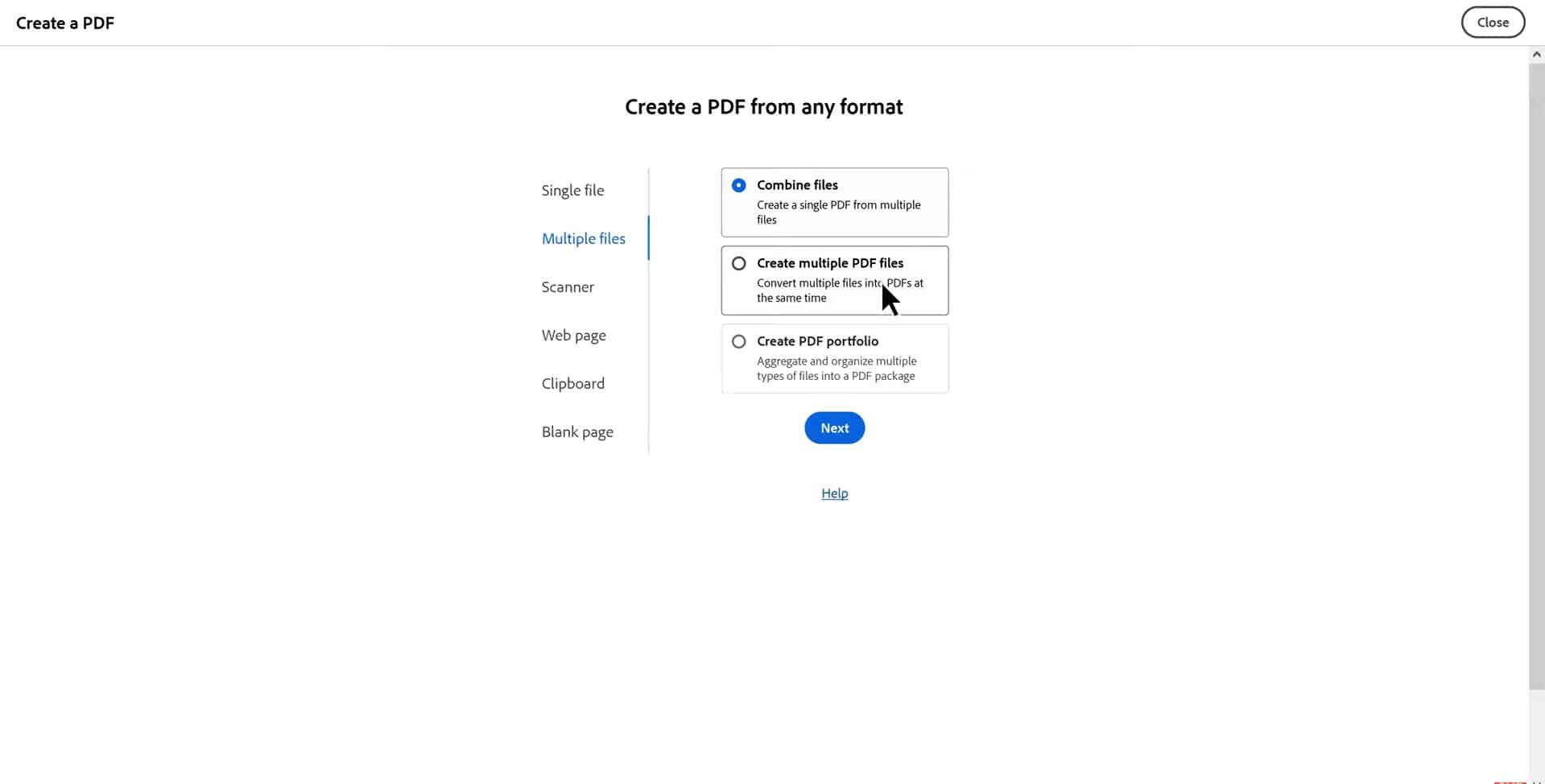
- Combine multiple files into a single, organized PDF document
- Create PDFs from emails, including attachments and formatting
- Generate PDFs from CAD drawings and technical documents
The batch conversion feature saves enormous amounts of time when you need to process multiple documents. Simply select all your files, choose your settings, and let Adobe Acrobat Pro DC handle the rest while you focus on other important tasks.
Professional PDF Editing Capabilities
Gone are the days when PDFs were considered “read-only” documents. Adobe Acrobat Pro DC 2025 brings word processor-like editing functionality to PDF files. You can modify text, adjust fonts, resize images, and restructure entire pages without losing document quality.
Text Editing Features:
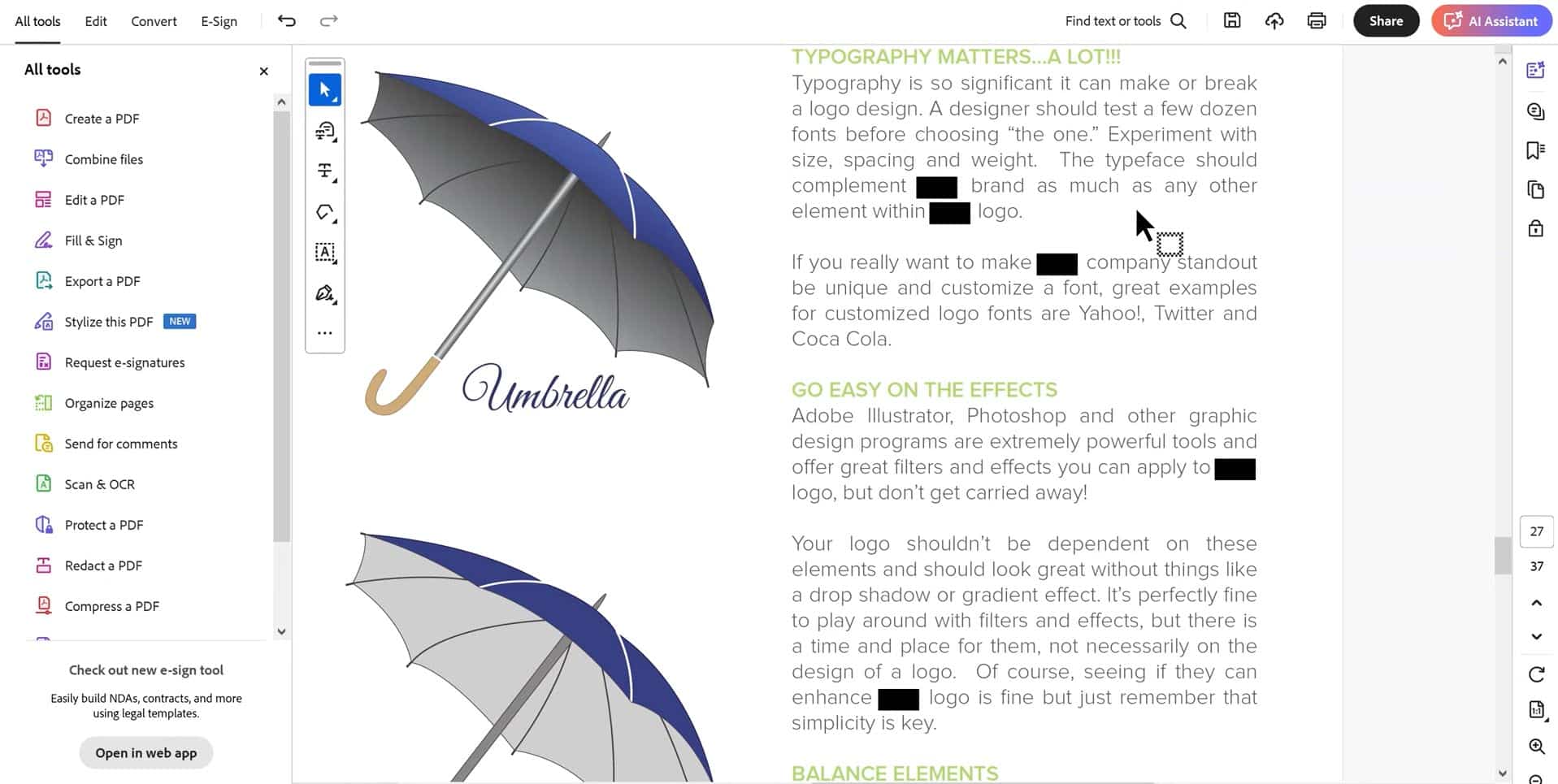
- Edit text directly within PDF documents using intuitive point-and-click interface
- Add, delete, or rearrange paragraphs while maintaining proper formatting
- Change fonts, colors, and sizes to match your document style
- Correct typos and spelling errors instantly
- Add headers, footers, watermarks, and page numbers across entire documents
Image and Object Manipulation:
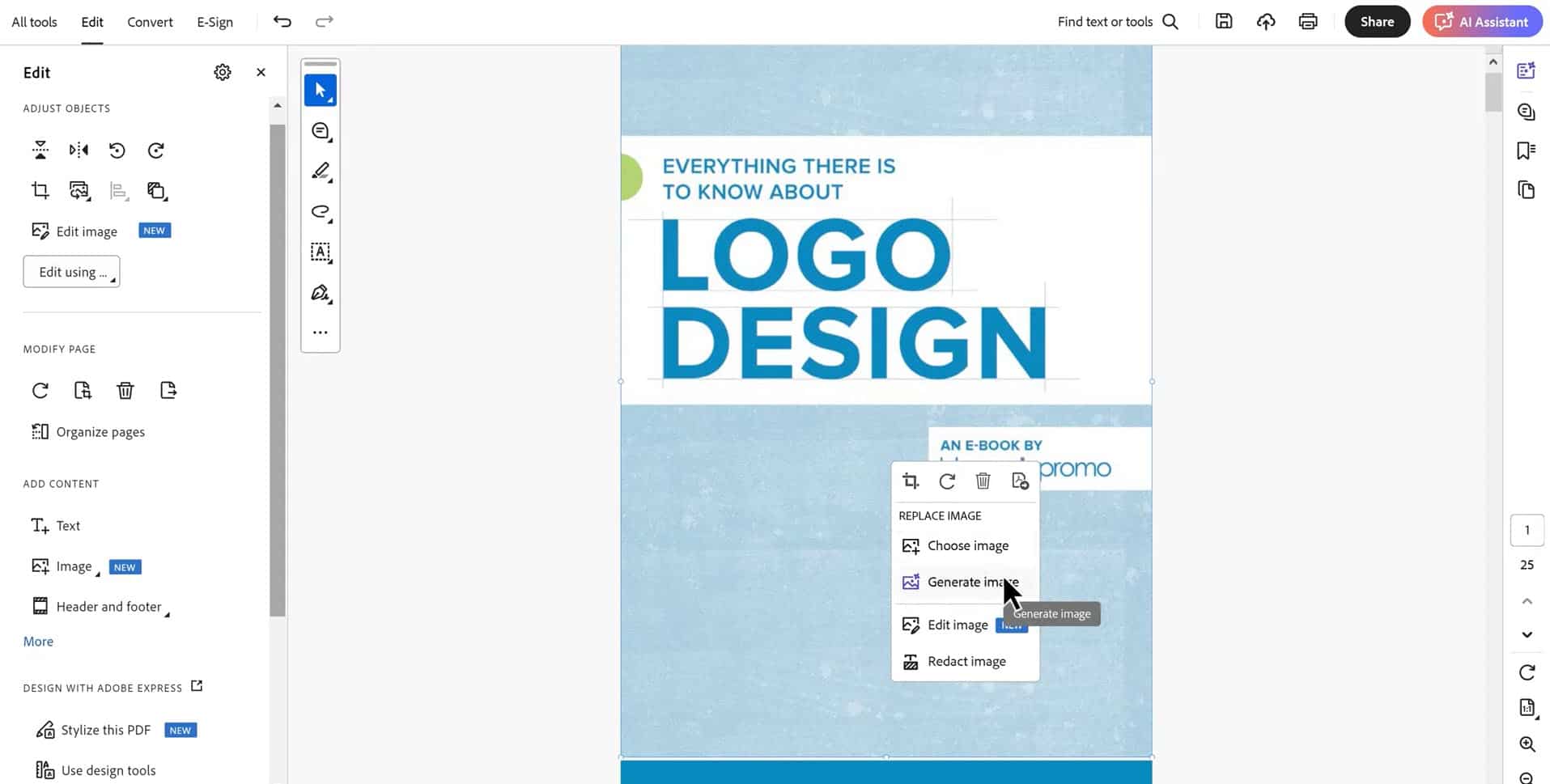
- Replace, resize, and reposition images within PDF documents
- Add new images, logos, and graphics with drag-and-drop simplicity
- Crop and adjust image properties without external editing software
- Create transparent backgrounds and adjust image opacity
- Link images to external URLs or internal document sections
Advanced Form Creation and Management
Transform static documents into interactive, professional forms that collect data efficiently. Adobe Acrobat Pro DC 2025’s form creation tools are incredibly powerful yet surprisingly easy to use.
Interactive Form Elements:
- Create text fields, checkboxes, radio buttons, and dropdown menus
- Add digital signature fields for secure document signing
- Build calculation fields that automatically compute totals and formulas
- Design multi-page forms with consistent formatting and navigation
- Include validation rules to ensure accurate data entry
Form Distribution and Data Collection:
- Email forms directly to recipients with tracking capabilities
- Collect responses automatically in organized spreadsheet format
- Set up automatic email notifications when forms are submitted
- Create password-protected forms for sensitive information
- Generate detailed analytics on form completion rates and user behavior
Digital Signature and Security Features
Security is paramount when dealing with important documents. Adobe Acrobat Pro DC 2025 provides enterprise-level security features that protect your sensitive information while enabling secure collaboration.
Digital Signature Capabilities:
- Create legally binding digital signatures that are accepted worldwide
- Set up multiple signature fields for documents requiring multiple approvers
- Add timestamp and certificate information to verify signature authenticity
- Create custom signature appearances with logos and personal information
- Track signature status and send automatic reminders to pending signers
Document Security Options:
- Password-protect PDFs with user-level and owner-level permissions
- Encrypt documents using 256-bit AES encryption standards
- Control printing, copying, and editing permissions for each document
- Add redaction tools to permanently remove sensitive information
- Create security policies that can be applied across multiple documents
OCR and Text Recognition Technology
Adobe Acrobat Pro DC 2025 includes industry-leading Optical Character Recognition (OCR) technology that converts scanned documents and images into fully searchable and editable text.
OCR Capabilities:
- Recognize text in over 35 languages with high accuracy rates
- Convert scanned documents into searchable PDFs automatically
- Maintain original formatting while making text selectable and editable
- Process handwritten text and convert it to digital format
- Batch process multiple scanned documents simultaneously
Enhanced Search Functionality:
- Search across entire PDF collections instantly
- Find specific words, phrases, or formatting elements
- Create searchable indexes for large document libraries
- Use advanced search operators for precise results
- Highlight and bookmark search results for future reference
Collaboration and Review Tools
Modern business requires seamless collaboration, and Adobe Acrobat Pro DC 2025 delivers powerful tools that make document review and approval processes smooth and efficient.
Commenting and Markup Tools:
- Add sticky notes, highlights, and text comments to any part of a document
- Use drawing tools to circle, underline, or sketch on documents
- Create stamps for approval, rejection, or status updates
- Track all comments and changes with detailed author information
- Organize comments by author, date, or document section
Review Workflow Management:
- Set up structured review processes with multiple reviewers
- Send documents for review with automatic email notifications
- Track review progress and send reminders to pending reviewers
- Compare different versions of documents to identify changes
- Merge comments from multiple reviewers into a single document
Page Organization and Document Management
Managing large, complex documents becomes effortless with Adobe Acrobat Pro DC 2025’s comprehensive page management tools.
Page Manipulation Features:
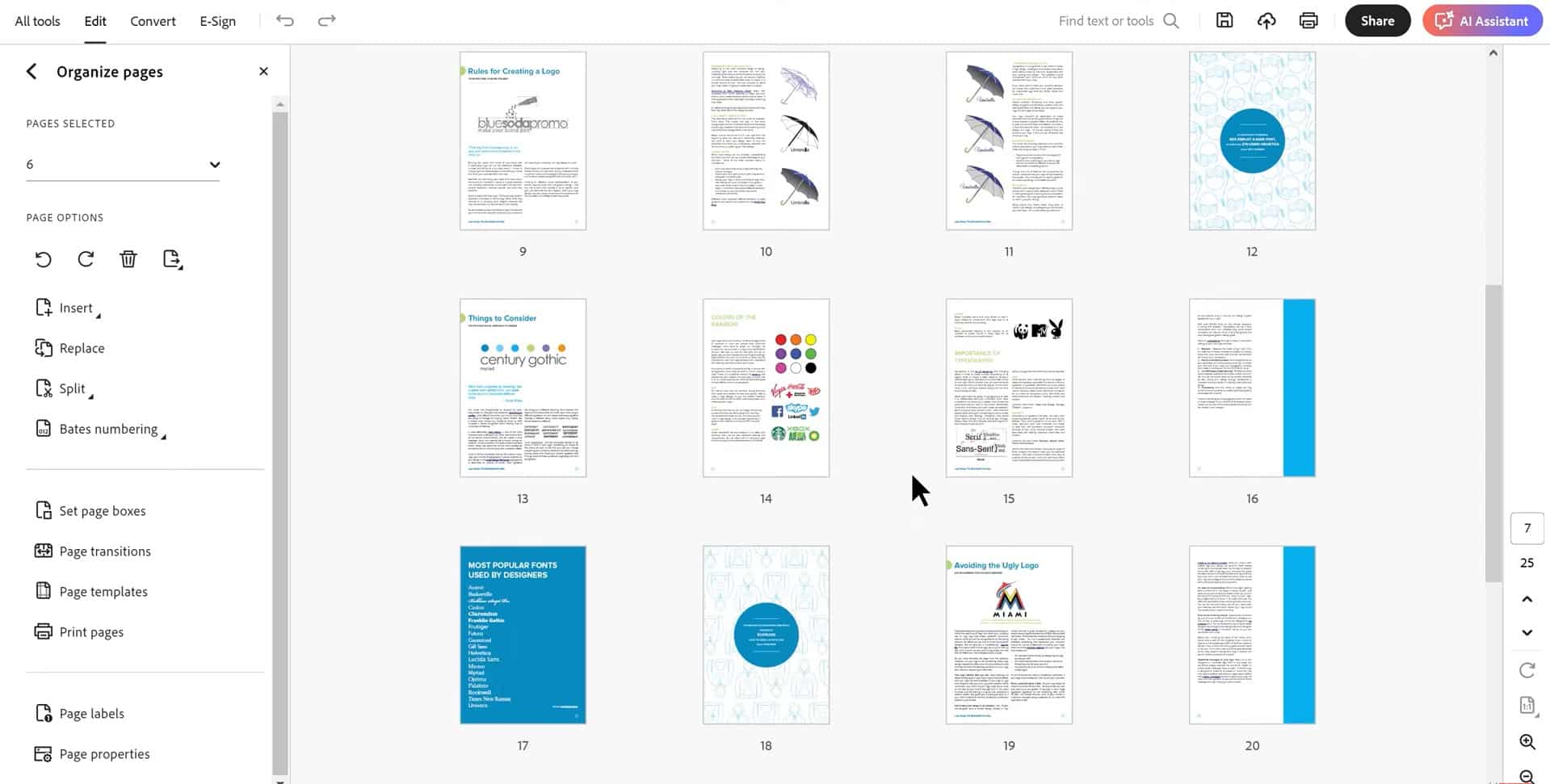
- Rearrange pages with simple drag-and-drop functionality
- Extract specific pages to create new documents
- Rotate, crop, and resize pages individually or in batches
- Insert pages from other documents at any location
- Delete unwanted pages while maintaining document integrity
Document Organization Tools:
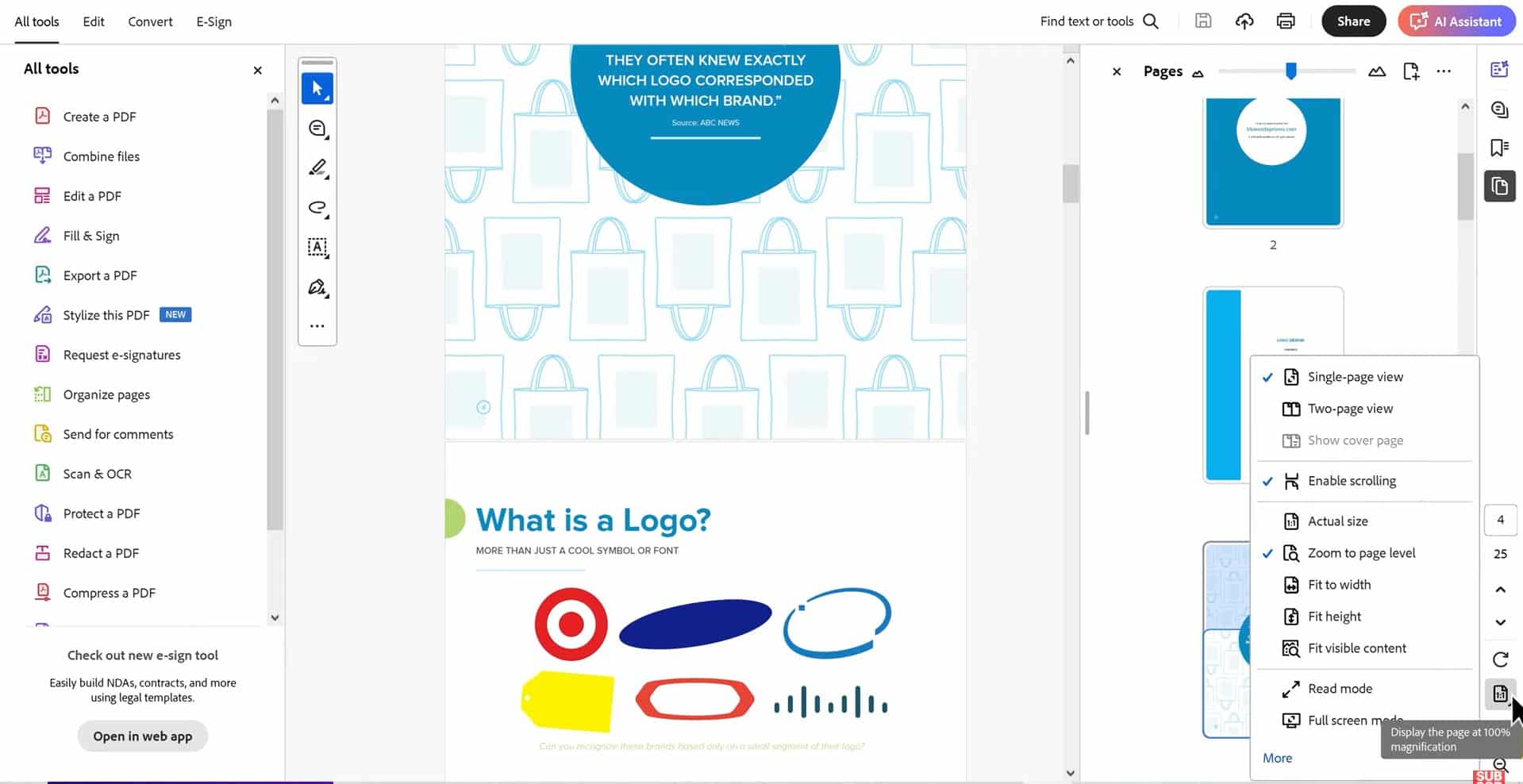
- Create bookmarks for easy navigation through long documents
- Add hyperlinks between sections and to external resources
- Generate automatic table of contents with clickable links
- Create custom page layouts and templates
- Apply consistent formatting across entire document collections
Advanced Export and Conversion Options
Adobe Acrobat Pro DC 2025 doesn’t just create PDFs – it also converts them back to editable formats when needed, maintaining as much original formatting as possible.
Export Formats:
- Convert PDFs to Microsoft Word documents with preserved formatting
- Export to Excel spreadsheets with intact tables and calculations
- Create PowerPoint presentations from PDF slides
- Generate HTML files for web publishing
- Export images in various formats including JPEG, PNG, and TIFF
Batch Processing Capabilities:
- Convert multiple PDFs simultaneously using batch processing
- Apply the same conversion settings across entire document libraries
- Schedule conversions to run during off-hours
- Create conversion templates for consistent results
- Monitor conversion progress and receive completion notifications
Installation and Activation: Simple and Secure
Getting started with Adobe Acrobat Pro DC 2025 couldn’t be easier. When you purchase this Lifetime Activation version, you receive everything needed for immediate installation and activation.
Digital Download and Instant Delivery
Your purchase includes instant digital download access, meaning you can start using Adobe Acrobat Pro DC 2025 within minutes of completing your order. No waiting for physical media, no shipping delays – just immediate access to professional PDF tools.
What You Receive:
- Complete Adobe Acrobat Pro DC 2025 installation files
- Authentic license key for permanent activation
- Step-by-step installation instructions
- Free technical support for installation and activation
- Money-back guarantee for complete peace of mind
Windows Compatibility
Adobe Acrobat Pro DC 2025 is fully optimized for modern Windows operating systems, ensuring smooth performance and seamless integration with your existing software ecosystem.
System Compatibility:
- Full support for Windows 10 (all versions)
- Complete compatibility with Windows 11
- Optimized for both 32-bit and 64-bit systems
- Integrates seamlessly with Microsoft Office applications
- Works perfectly with all major web browsers
Easy Installation Process
The installation process has been streamlined to get you up and running quickly, even if you’re not technically inclined.
Installation Steps:
- Download the installation files from the secure link provided
- Run the installer and follow the simple on-screen instructions
- Enter your authentic license key when prompted
- Complete the activation process with our free technical support
- Start creating and editing PDFs immediately
Free Installation and Activation Support
We understand that software installation can sometimes be challenging, which is why we provide free technical support to ensure your Adobe Acrobat Pro DC 2025 is properly installed and activated.
Support Services Included:
- Free installation assistance via phone, email, or remote desktop
- License activation support to ensure permanent operation
- Troubleshooting help for any installation issues
- Configuration guidance for optimal performance
- Post-installation support for basic software questions
Why This Authentic License Matters
When you purchase Adobe Acrobat Pro DC 2025 with Lifetime Activation, you’re getting a completely legitimate, authentic license that provides full access to all software features and updates.
Original and Genuine Software
This is not a cracked version, trial extension, or unauthorized copy. You receive the complete, unmodified Adobe Acrobat Pro DC 2025 software with all original features and functionality intact.
Authenticity Guarantees:
- Original software directly from Adobe’s distribution channels
- Genuine license key that activates all software features
- Full access to Adobe’s official documentation and resources
- Eligibility for technical support from Adobe (where applicable)
- Complete compliance with software licensing regulations
Global License Coverage
Your Adobe Acrobat Pro DC 2025 license is valid worldwide, meaning you can use the software regardless of your location or travel requirements.
Global Features:
- Valid in all countries and territories
- Multi-language support for international users
- No geographic restrictions on software usage
- Compatible with international document standards
- Support for global PDF accessibility requirements
Money-Back Guarantee
We stand behind the quality and authenticity of our Adobe Acrobat Pro DC 2025 with a comprehensive money-back guarantee.
Guarantee Coverage:
- Full refund if software fails to install properly
- Money back if license key doesn’t activate successfully
- Refund available if software doesn’t meet your expectations
- No questions asked return policy within guarantee period
- Fast refund processing through secure payment systems
Business and Professional Applications
Adobe Acrobat Pro DC 2025 is designed for serious business and professional use, providing tools that enhance productivity and streamline document workflows across various industries.
Legal and Compliance Applications
Legal professionals rely on Adobe Acrobat Pro DC for document preparation, client communication, and regulatory compliance.
Legal Features:
- Redaction tools for removing confidential information permanently
- Digital signatures that meet legal standards for document authenticity
- Bates numbering for legal document organization
- Password protection for sensitive legal documents
- OCR technology for searchable case file management
Business and Corporate Use
Modern businesses use Adobe Acrobat Pro DC 2025 for everything from contract management to marketing material creation.
Business Applications:
- Contract creation and digital signature collection
- Marketing brochure and presentation development
- Employee handbook and policy document management
- Financial report compilation and distribution
- Client proposal creation with interactive elements
Educational and Academic Applications
Educational institutions and academic professionals benefit from Adobe Acrobat Pro DC’s comprehensive document creation and management capabilities.
Educational Features:
- Create interactive worksheets and assignments
- Develop accessible documents for students with disabilities
- Combine research materials into organized study guides
- Create fillable forms for student information collection
- Generate bibliographies and citation-compliant documents
Healthcare and Medical Applications
Healthcare professionals use Adobe Acrobat Pro DC 2025 for patient documentation, medical form creation, and regulatory compliance.
Medical Applications:
- HIPAA-compliant document security and encryption
- Medical form creation with calculation fields
- Patient record organization and management
- Digital signature collection for medical consent forms
- Redaction tools for protecting patient privacy
Cost Savings and Value Proposition
Choosing Adobe Acrobat Pro DC 2025 with Lifetime Activation represents significant long-term savings compared to subscription-based alternatives.
One-Time Payment vs. Recurring Subscriptions
Traditional Adobe Creative Cloud subscriptions can cost hundreds of dollars per year, making the lifetime activation option incredibly cost-effective.
Cost Comparison:
- Adobe Creative Cloud PDF Pack: $12.99 per month ($155.88 annually)
- Adobe Acrobat Pro DC subscription: $14.99 per month ($179.88 annually)
- Our Lifetime Activation: One-time payment, no recurring fees
- Break-even point: Typically achieved within the first year
- Lifetime savings: Thousands of dollars over software lifetime
No Hidden Fees or Surprise Charges
With lifetime activation, you know exactly what you’re paying upfront, with no surprise subscription renewals or automatic charges.
Transparent Pricing Benefits:
- No monthly subscription fees ever
- No automatic renewals to forget about
- No credit card required for ongoing use
- No feature limitations based on subscription tier
- Complete software ownership with full feature access
Budget Predictability
For businesses and professionals, having predictable software costs makes budgeting and financial planning much easier.
Budgeting Advantages:
- One-time capital expense instead of ongoing operational costs
- No annual budget allocation required for PDF software
- Predictable technology costs for multi-year planning
- No subscription price increases to worry about
- Complete control over software upgrade timing
Security and Privacy Considerations
Adobe Acrobat Pro DC 2025 includes robust security features that protect your documents and ensure privacy compliance across various regulatory frameworks.
Document Encryption and Protection
Modern business requires strong document security, and Adobe Acrobat Pro DC delivers military-grade protection for your sensitive information.
Encryption Features:
- 256-bit AES encryption for maximum security
- Password protection with user and owner permission levels
- Certificate-based security for enterprise environments
- Digital rights management for controlled document distribution
- Secure document transmission and storage options
Privacy Compliance
Adobe Acrobat Pro DC 2025 helps organizations maintain compliance with privacy regulations like GDPR, HIPAA, and other data protection requirements.
Compliance Tools:
- Redaction tools for permanent information removal
- Audit trails for document access and modification tracking
- Metadata removal tools for privacy protection
- Secure sharing options with access controls
- Digital signature validation for document integrity
Enterprise Security Features
Large organizations benefit from Adobe Acrobat Pro DC’s enterprise-level security capabilities.
Enterprise Security:
- Integration with existing security infrastructure
- Single sign-on (SSO) compatibility
- Group policy management for IT administrators
- Certificate authority integration for digital signatures
- Network deployment options for organization-wide installation
Performance and Reliability
Adobe Acrobat Pro DC 2025 is engineered for reliable performance, even when handling large, complex documents and high-volume processing tasks.
Optimized Performance
The software is optimized to handle demanding PDF processing tasks efficiently while maintaining system responsiveness.
Performance Features:
- Fast PDF creation and conversion processing
- Efficient memory usage for large document handling
- Multi-threaded processing for improved speed
- Optimized rendering for smooth document viewing
- Background processing to maintain system responsiveness
Reliability and Stability
Adobe Acrobat Pro DC 2025 is built on decades of PDF technology development, ensuring reliable operation in critical business environments.
Reliability Features:
- Crash recovery to prevent document loss
- Automatic document saving during long editing sessions
- Error handling for corrupted or damaged PDF files
- Version history tracking for document recovery
- Robust file format support for maximum compatibility
Scalability for Growing Needs
As your document processing needs grow, Adobe Acrobat Pro DC 2025 scales to meet increased demands without performance degradation.
Scalability Features:
- Batch processing for high-volume document conversion
- Template-based automation for repetitive tasks
- Integration with document management systems
- API access for custom workflow development
- Network licensing options for multi-user environments
Integration Capabilities
Adobe Acrobat Pro DC 2025 integrates seamlessly with existing software and workflows, making it a natural addition to your current productivity suite.
Microsoft Office Integration
Deep integration with Microsoft Office applications makes Adobe Acrobat Pro DC feel like a natural extension of your existing tools.
Office Integration Features:
- One-click PDF creation from Word, Excel, and PowerPoint
- Embedded PDF viewing within Office applications
- Comment synchronization between Office and Acrobat
- Digital signature integration with Office workflows
- Template sharing between Office and Acrobat
Cloud Storage Integration
Modern workflows require cloud integration, and Adobe Acrobat Pro DC 2025 works seamlessly with popular cloud storage services.
Cloud Integration:
- Direct integration with OneDrive, Dropbox, and Google Drive
- Automatic document synchronization across devices
- Cloud-based collaboration and sharing features
- Real-time document access from any location
- Secure cloud storage with encryption protection
Email and Communication Integration
Adobe Acrobat Pro DC integrates with email systems and communication platforms to streamline document sharing and collaboration.
Communication Integration:
- Direct email sending from within Acrobat
- Email tracking for document delivery confirmation
- Automated review request and reminder emails
- Integration with Outlook for seamless workflow
- Comment notification systems for collaborative review
Advanced Automation Features
Adobe Acrobat Pro DC 2025 includes powerful automation tools that eliminate repetitive tasks and improve workflow efficiency.
Action Wizard
The Action Wizard allows you to create custom automation sequences that can be applied to single documents or entire document collections.
Automation Capabilities:
- Create multi-step workflows with point-and-click simplicity
- Apply consistent formatting across document libraries
- Automate security settings and password protection
- Batch process conversion and optimization tasks
- Schedule automated workflows to run at specific times
JavaScript Automation
For advanced users, Adobe Acrobat Pro DC 2025 includes JavaScript support for creating sophisticated automation solutions.
JavaScript Features:
- Custom form calculations and validation rules
- Advanced document processing automation
- Integration with external databases and systems
- Custom user interface creation for specialized workflows
- API integration for enterprise-level automation
Template-Based Automation
Create reusable templates that standardize document creation and ensure consistent formatting across your organization.
Template Features:
- Custom form templates with pre-configured fields
- Standardized document layouts and formatting
- Automated content population from data sources
- Brand-compliant document templates
- Version control for template management
Accessibility and Compliance Features
Adobe Acrobat Pro DC 2025 includes comprehensive accessibility features that ensure your documents meet accessibility standards and regulatory requirements.
PDF Accessibility Standards
Create documents that comply with Section 508, WCAG 2.0, and other accessibility standards automatically.
Accessibility Features:
- Automatic tagging for screen reader compatibility
- Alternative text creation for images and graphics
- Reading order optimization for logical document flow
- Color contrast validation for visual accessibility
- Keyboard navigation support for all interactive elements
Accessibility Checker
Built-in accessibility checking tools identify and help resolve accessibility issues before document distribution.
Checking Tools:
- Comprehensive accessibility report generation
- Step-by-step remediation guidance
- Batch accessibility checking for document collections
- Accessibility template creation for consistent compliance
- Integration with assistive technology testing tools
Compliance Documentation
Generate detailed compliance reports that demonstrate adherence to accessibility standards and regulatory requirements.
Compliance Reports:
- Detailed accessibility compliance documentation
- Standards verification reports
- Remediation tracking and progress reports
- Compliance certificate generation
- Audit trail documentation for regulatory review
Mobile and Cross-Platform Compatibility
While Adobe Acrobat Pro DC 2025 is designed for Windows, it creates documents that are fully compatible across all devices and platforms.
Universal PDF Compatibility
Documents created with Adobe Acrobat Pro DC 2025 work perfectly on all devices and operating systems.
Cross-Platform Features:
- Perfect rendering on Mac, Windows, iOS, and Android devices
- Consistent formatting across all viewing platforms
- Interactive elements that work on mobile devices
- Responsive design elements for various screen sizes
- Offline viewing capability on all platforms
Mobile Integration
While the full version runs on Windows, you can access and interact with your documents on mobile devices through Adobe’s mobile apps.
Mobile Features:
- Document synchronization with Adobe mobile apps
- Mobile editing capability for quick changes
- Mobile signature collection and approval workflows
- Cloud-based document access from any device
- Mobile-optimized viewing for on-the-go productivity
Customer Support and Resources
Your purchase of Adobe Acrobat Pro DC 2025 with Lifetime Activation includes comprehensive support resources to ensure you get maximum value from your investment.
Installation Support
Our technical support team provides free assistance with installation and activation to ensure your software is working properly from day one.
Installation Support Includes:
- Pre-installation system compatibility verification
- Step-by-step installation guidance
- Remote desktop assistance when needed
- License activation support and troubleshooting
- Post-installation configuration assistance
Learning Resources
We provide extensive learning resources to help you master Adobe Acrobat Pro DC 2025 quickly and efficiently.
Educational Resources:
- Comprehensive user manual and documentation
- Video tutorials covering all major features
- Best practices guides for professional workflows
- Template libraries for common document types
- Regular tips and tricks newsletters
Ongoing Support
While Adobe Acrobat Pro DC 2025 with Lifetime Activation doesn’t include Adobe’s subscription-based support, we provide ongoing assistance for license-related issues.
Continued Support:
- License activation support throughout software lifetime
- Installation assistance for system upgrades
- Troubleshooting help for license-related issues
- Replacement license keys if needed
- Migration assistance for new computer systems
Making the Right Choice: Why Adobe Acrobat Pro DC 2025 with Lifetime Activation
In a world where software subscriptions drain budgets and create ongoing financial commitments, Adobe Acrobat Pro DC 2025 with Lifetime Activation represents a smart, economical choice for professionals and businesses who need reliable PDF capabilities.
Immediate Benefits
From the moment you install Adobe Acrobat Pro DC 2025, you’ll experience immediate improvements in your document workflow efficiency.
Instant Improvements:
- Professional PDF creation from any source document
- Advanced editing capabilities that eliminate document recreation
- Time-saving automation for repetitive tasks
- Enhanced collaboration through review and commenting tools
- Professional document security and digital signatures
Long-Term Value
The lifetime activation model provides exceptional long-term value that becomes more significant with each passing year.
Long-Term Benefits:
- No ongoing subscription costs ever
- Complete software ownership and control
- Predictable technology budgeting
- Independence from subscription price increases
- Permanent access to professional PDF tools
Professional Credibility
Using Adobe Acrobat Pro DC 2025 enhances your professional credibility by ensuring your documents always look polished and professional.
Professional Advantages:
- Industry-standard PDF creation and editing
- Professional digital signatures that are legally recognized
- Consistent document formatting and presentation
- Advanced security features for sensitive information
- Compliance with accessibility and regulatory standards
Your Investment in Productivity Excellence
Adobe Acrobat Pro DC 2025 with Lifetime Activation isn’t just software – it’s an investment in your productivity, professionalism, and long-term success. With its comprehensive feature set, reliable performance, and permanent ownership model, it provides exceptional value that continues to pay dividends year after year.
Secure Your Copy Today
Don’t let subscription fatigue and ongoing software costs drain your productivity budget. Secure your copy of Adobe Acrobat Pro DC 2025 with Lifetime Activation today and enjoy permanent access to the world’s most powerful PDF tools.
Purchase with Confidence:
- Instant digital download and activation
- Authentic, original software with full features
- Free installation and activation support
- Money-back guarantee for complete peace of mind
- Global license valid worldwide
- Secure online payment processing
- Trusted store with excellent customer reviews
Transform your document workflow, enhance your professional capabilities, and invest in productivity tools that truly belong to you. Adobe Acrobat Pro DC 2025 with Lifetime Activation – the smart choice for professionals who value quality, reliability, and long-term value.
Purchase your copy today and experience the difference that professional PDF tools can make in your daily workflow. With Adobe Acrobat Pro DC 2025, you’re not just buying software – you’re investing in a more productive, more professional future.
Related products
-
Adobe InDesign 2026 lifetime activation for MAC
Original price was: $49.99.$39.99Current price is: $39.99. -
Adobe Animate 2024 – Lifetime Activation For Windows
Original price was: $49.99.$39.99Current price is: $39.99. -
Adobe Bridge 2026 – Lifetime Activation For Windows
Original price was: $59.99.$29.99Current price is: $29.99. -
Luminar 4 Photo Editor 2020 creative photo editing – Original for Windows
Original price was: $39.99.$19.99Current price is: $19.99. -
Nuance PaperPort 14.6 Professional scanning, converting,editing documents
Original price was: $29.99.$19.99Current price is: $19.99.




 Adobe Audition 2026 Lifetime License for Windows